There are four possible reasons for this result:
cause
#1:
The most likely reason for this behaviour is that you do not have Java installed on your computer.
You can download and install the Sun Java plug-in at this address:
http://www.java.com/en/download/manual.jsp
After installation, you can verify the running Java version at
http://www.java.com/en/download/installed.jsp
cause
#2:
Another possible cause for this behaviour is that you do not have Java enabled on
your browser.
To verify if this is the case, do the following in Internet Explorer 7 or 8:
Select the "Tools" Menu -> "Internet Options" -> "Advanced Tab"
Once you are in the Advanced Tab of the Internet Options dialog box, scroll down
to the setting for: Java (SUN) To enable the Java Runtime Environment, check the
"Use JRE 1.6….for <applet> (requires restart)" checkbox, this requires a restart
of the browser, not of the computer:
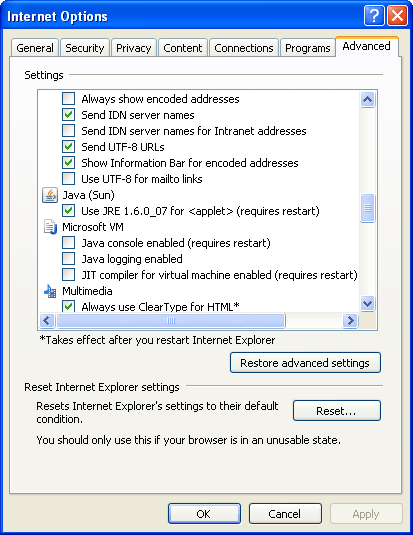
If you do not see this option listed, then you do not have Java installed. Please
refer to Cause #1 above.
Netscape and Opera ship with Java but it needs to be explicitly selected for installation
during the browser installation.
Cause #3:
The third possibility is that you have both Microsoft and Sun's versions of Java
installed and enabled on your computer and they are conflicting with one another.
To solve this issue, follow the steps in Cause #2
and select only
one version of Java to use; Sun's or Microsoft's.
Cause #4:
The final possibility for this behavior is that your version of Java may be corrupt.
To solve this issue, uninstall your current version of Java (Control Panel -> Add
or Remove Programs -> Java …) and then download a new version from Sun following
the instructions contained in Cause #1
.
 Back to top